
The missing link in mobile zero trust: Trustd MTD threat intelligence is now available in Microsoft Intune
Zero trust sounds simple: never assume a device is safe just because a user has the right password. In practice, the difficult part is connecting what is happening on a mobile device to the access decision that protects company data.
That connection has just become much stronger. Trustd MTD is now a Microsoft Intune Mobile Threat Defense partner, supporting both managed-device (MDM) and un-managed devices or mobile application management (MAM) scenarios. Trustd MTD’s AI-powered detection can feed mobile risk into Intune so that Device Threat Level becomes part of the policy decision – not another alert waiting in a dashboard.
Mobile is now an access point – and an attack surface
Mobile working has made email, Teams, files, and business applications available from almost anywhere. It has also moved a valuable slice of the organisation’s attack surface onto devices that are personal, lightly managed or easy to overlook.
Trustd Mobile’s 2026 Mobile Threat Crisis Survey of 150 cybersecurity leaders in organisations with 100 to 10,000 employees found that 73% had suffered a breach originating from a mobile device in the previous year. Respondents identified malware apps (47%), mobile phishing (42%), Wi-Fi threats (34%) and vulnerable operating systems (18%) among the routes involved. The research also found insecure BYOD mobiles in 89% of organisations.
These findings make a crucial point: visibility is not the same as control. A security team may know that a mobile is vulnerable or under attack, but the organisation remains exposed if that knowledge cannot affect access quickly and consistently.
What changes with the Intune MTD integration
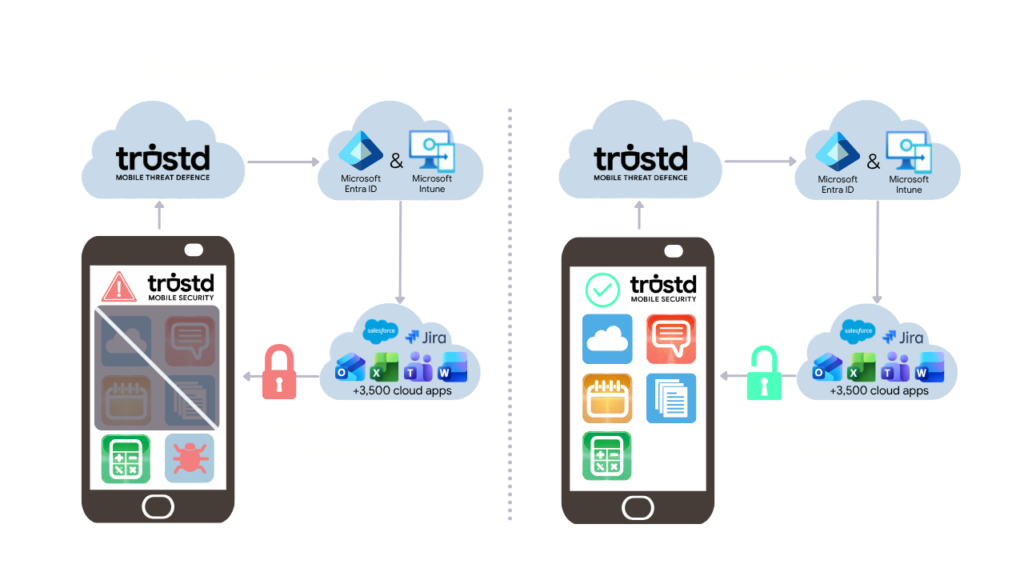
The Trustd MTD integration creates a policy bridge between mobile threat detection and Microsoft Intune. Trustd MTD assesses telemetry from the device and reports each device’s Threat Level level through the Intune Mobile Threat Defense connector. Intune can then automatically use that Device Threat Level condition to control access to company data.
For managed devices, that signal can influence device compliance. Conditional Access policies can require a device to be compliant before it accesses selected company resources. If Trustd MTD identifies a risk that breaches the organisation’s policy threshold, the device can be marked noncompliant and access can be blocked until the issue is remediated.
For unmanaged or BYOD devices, Intune app protection policies can evaluate the Device Threat Level supplied by Trustd MTD and Conditional Access can enforce the app protection policy. This applies the security decision to protected company data in managed apps without requiring the organisation to take full MDM control of the personal device.
Trustd MTD detects and assesses. Intune evaluates the Device Threat Level. Conditional Access and app protection policies enforce the organisation’s decision.
A simpler route for MAM and BYOD
Unmanaged mobile devices have historically created an awkward choice: accept a security gap, or ask users to enrol a personal device into management they may not want. MAM provides a middle path by protecting organisational data inside managed apps without enrolling the whole device.
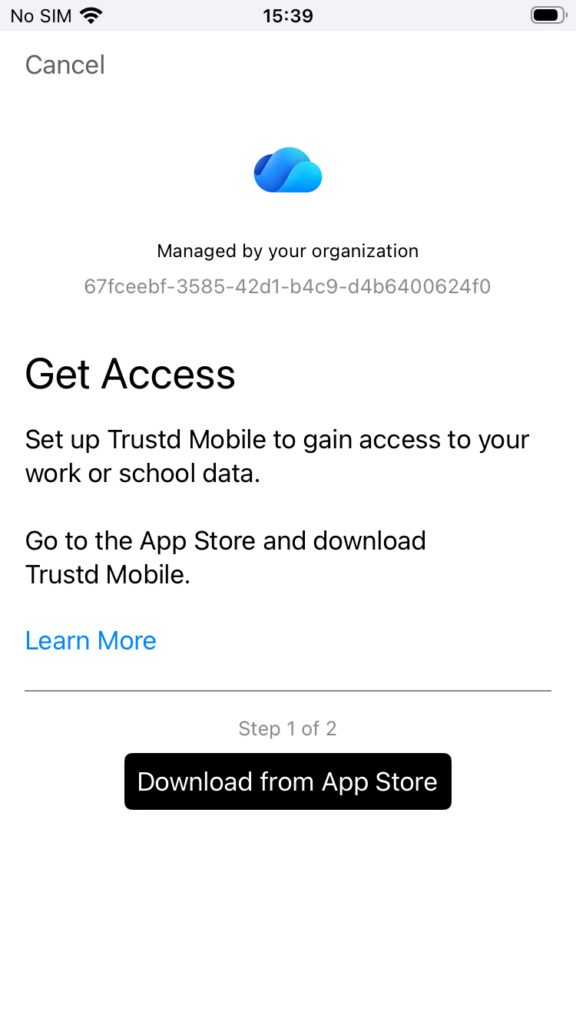
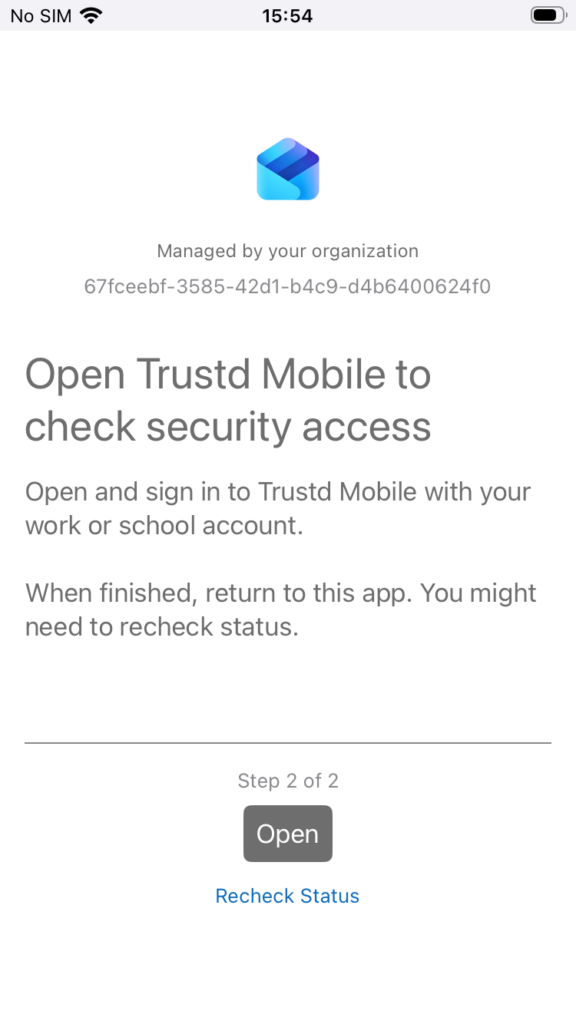
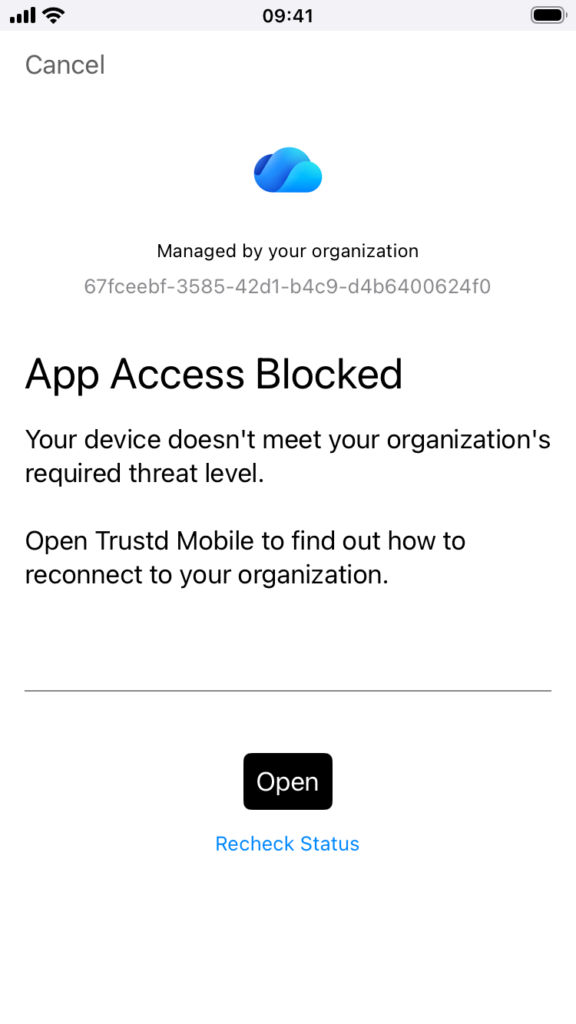
Trustd MTD now adds a simple Sign in with Microsoft flow for this scenario. The user signs in with their work identity through the Trustd app so the device’s Threat Level can be associated with the Intune app protection evaluation. Administrators, connect the MTD connector in Intune and set the maximum allowed Device Threat Level in the relevant Android and iOS app protection policies. If the Trustd app isn’t installed, hasn’t checked their device or has detected a threat; Managed Apps will guide the user through the installation, onboarding or remediation steps of the Trustd App.
For the user, the experience is familiar. Managed apps will guide the user to install and connect the Trustd Mobile app; and will guide them into the Trustd Mobile app if a threat is detected to remediate the threat.
For the security team, it means threat-led access controls can reach devices that are deliberately not enrolled into MDM. This is especially valuable for BYOD, contractors and mixed estates where company data must be protected without treating every handset as company property.
Zero-touch protection for managed estates
On managed devices, the fastest security control is the one that arrives configured. Trustd MTD can be deployed through Intune with managed app configuration and zero-touch protection settings, reducing the number of steps users have to complete and removing a device-by-device rollout burden from IT.
That result matters because mobile security programmes fail when operational friction overwhelms the security benefit. Fast deployment, minimal user effort and guided remediation are not secondary features: they determine how much of the estate is genuinely covered.
Why AI-powered and heuristic detection matters to access control
Traditional, signature-led controls are strongest when a threat is already known. Mobile phishing sites and malicious apps can change quickly, and network attacks or device weaknesses may not fit a simple known-bad list. Trustd MTD combines AI-powered detection with heuristic techniques to identify suspicious behaviour and risk indicators, including threats that static checks may miss.
Bringing those signals into Intune makes the detection operational. A risk score can influence the policy that decides whether a device remains trusted enough to reach company data. This turns mobile security from a periodic audit question into a continuous decision: is this device within the risk level we are prepared to accept right now?
Saving time, reducing breach cost and making compliance more continuous
The most visible value is breach prevention: a compromised or high-risk mobile can be prevented from becoming a route into corporate resources. The operational value is just as important. Automated deployment reduces implementation time; policy-based decisions reduce manual review; guided remediation helps users resolve issues; and access can be restored when the device returns within policy.
Trustd MTD also gives organisations a more consistent view of mobile security posture and supports compliance reporting, including evidence relevant to Cyber Essentials. No single integration guarantees compliance or certification, but continuous monitoring, enforceable access rules and audit-ready reporting make the work less dependent on last-minute spreadsheets and point-in-time checks.
Two paths, one outcome
A modern mobile estate rarely fits one management model. Some devices are fully managed; others are personal devices that should remain personal. The Trustd MTD and Microsoft Intune integration supports either reality or both together while applying the same zero-trust principle: access should follow current device risk, not assumptions.
For MDM, combine the connector with device compliance and zero-touch deployment. For MAM, use the new Sign in with Microsoft flow and Device Threat Level in app protection policies. In both cases, Trustd MTD’s threat intelligence combined with Conditional Access will control the access decision.
That is the powerful new capability: faster protection, broader coverage and a practical way to keep company data available only to mobile devices that remain within policy.
Next steps
- Review the Trustd Mobile integration overview and Microsoft licensing prerequisites.
- Add and authorise the Trustd Mobile connector in Intune and the Trustd MTD console.
- Choose the managed-device compliance path, the MAM app protection path, or both.
- Set the Device Threat Level threshold and test the block, remediation and restore journey with a pilot group.
- For existing Trustd zero-trust customers, follow the Trustd MTD migration steps.
Start with the Trustd MTD customer guide
Frequently asked questions
We’re already using Trustd MTD’s zero-trust Conditional Access. Can we migrate to the Intune partnership?
Yes. Follow the Microsoft Intune – Zero Trust Conditional Access section of the Trustd MTD getting-started guide. It covers adding the connector, authorising the integration, enabling Intune zero trust and configuring the relevant compliance and/or app protection policies.
Open the migration and setup guide
What licence do we need?
The capability is included in all Trustd MTD licences. Microsoft currently lists Microsoft Entra ID P1, Microsoft Intune Plan 1 and a Trustd Mobile subscription as prerequisites for the Trustd Mobile connector. Confirm your tenant’s specific licensing and role requirements in Microsoft Learn before deployment.
Review Microsoft prerequisites
Does it work with both managed and unmanaged devices?
Yes, based on the new Trustd MTD capability described in this launch. Managed devices use the MDM compliance-policy route. Unenrolled or BYOD devices use the MAM app protection-policy route, where Device Threat Level from the non-Microsoft MTD service can be evaluated without full-device enrolment.
What does Sign in with Microsoft do?
For a MAM user, the flow associates the Trustd MTD-protected device with the user’s Microsoft work identity so that its threat level can be evaluated by the Intune app protection policy. It is designed to simplify device-level risk evaluation for MAM without converting the device into a fully managed MDM device.
How does Trustd MTD affect Device Threat Level?
Trustd MTD analyses mobile telemetry using AI-powered detection and heuristic capabilities, then reports device risk through the Intune Mobile Threat Defense connector. Intune uses that signal in the Device Threat Level condition for device compliance and/or app protection policy evaluation, depending on the scenario.
What happens when a device becomes risky?
If the reported risk exceeds the organisation’s configured Device Threat Level threshold, the relevant compliance or app protection policy can restrict access to selected company resources or data. Managed apps will guide the users to open the Trustd Mobile Security app which guides the user to remediate the issue; when risk returns within policy and Managed apps re-evaluate the device, access can be automatically restored.
Which mobile platforms are supported?
Microsoft’s Trustd Mobile integration overview currently lists Android 9.0 and later and iOS/iPadOS 15.0 and later. Check Microsoft Learn for the latest support details before rollout.
Does this help us be Cyber Essentials compliant?
It can help automate mobile security controls, continuous posture monitoring and evidence generation relevant to Cyber Essentials.